Enhancing engagement in voluntary services
Empowering support for children through intelligent mobile engagement and meaningful contribution optimization.
MehrAfarin, NGOs, Tehran, Iran

Goal
Designing an easy-to-use app that engages people to find and apply for volunteer opportunities effortlessly and based on their desires.
Deliverable
Conducting interviews, UX research, defining problems, information architecture, ideation, wireframing, UX design, UI design, interface design, prototyping, and conducting usability studies.
Role & Duration
UX/UI Designer & Researcher, Sep 2022 - Jan 2023
UCD Process
Empathize
Define
Ideate
Prototype
Test
.png)

.png)


Objectives
Reaserch questions
UX research
Competitors audits
Empathy map
Persona
User story
User journey map
brain storming
User flow
IA
Paper wireframing
Design system
Wireframing
Prototyping
Usability study
Iteration design
1. Empathize
Objectives

Research questions
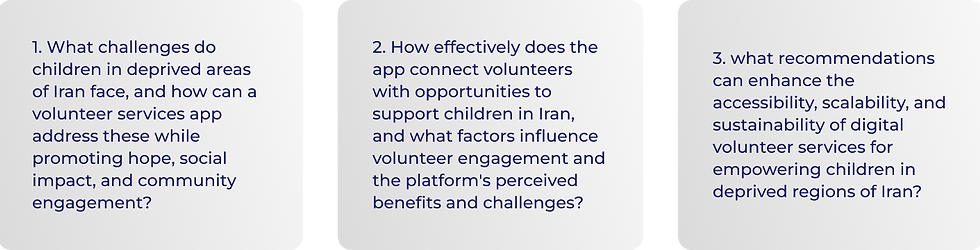
Qualitative & Quantitative research
Qualitative research, including interviews and competitive analysis, was used to understand the needs of children and volunteers through thematic analysis. Quantitative research involved surveys to gather data on the preferences and expectations of potential volunteers in Iran.
Competitive audits
Objectives

Ideation


Competitors

Results & Finding

2. Define
Using UCD methodology, insights from qualitative and quantitative research define volunteers' requirements as mobile users. Tools like empathy maps, user stories, and personas help understand user experiences, pain points, and opportunities for intervention in the app design.
Empathy mapping


User story (selected)

User persona (selected)

User journey map
Mapping the user journey highlights key touchpoints from login to participating in volunteer activities, guiding the design of user-centered wireframes.

Main pain points

3. Ideatin
Brain storming
.jpg)
8 crazy sketches

User Flow

Information Architecture

4. Prototyping
UI Kit
The mobile app logo features a rainbow with four arches beside Kian's name, symbolizing unity and support for children in Iran. Lightened pink, blue, green, and purple evoke peace and hope against a white background. Green and purple are for call-to-action buttons, while pink and blue distinguish different opportunities, ensuring intuitive understanding.
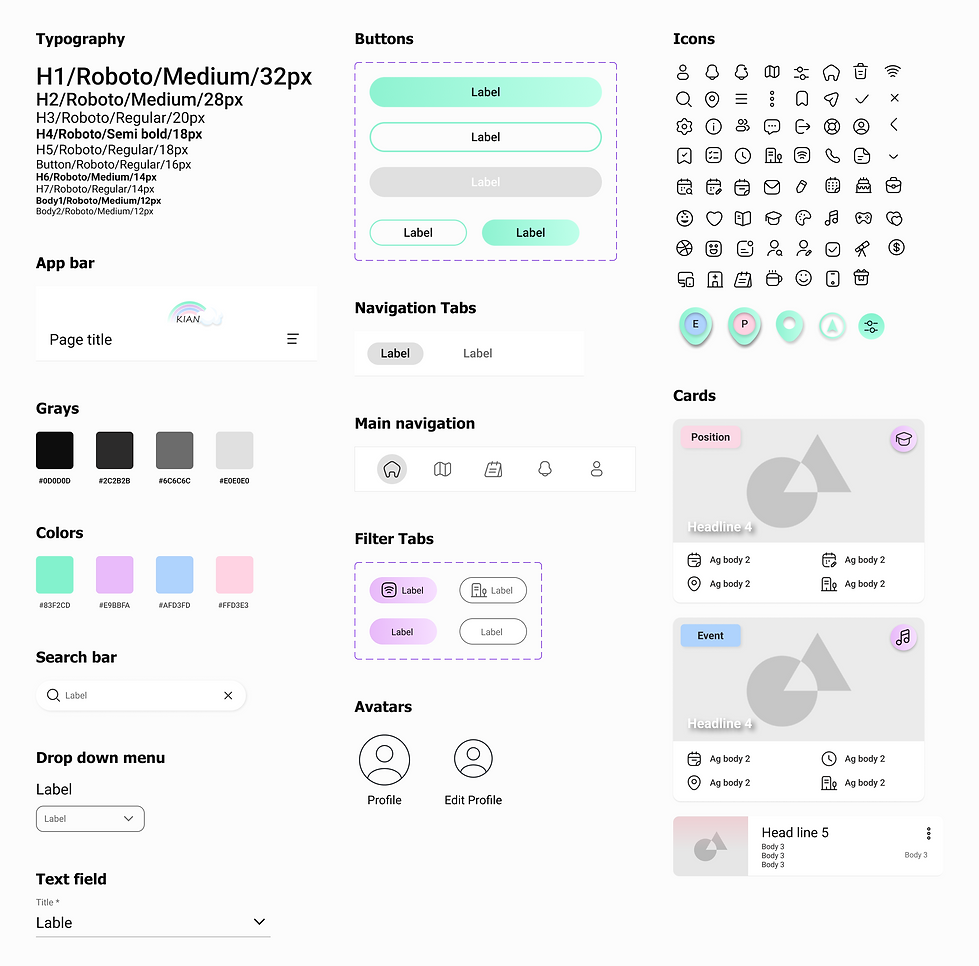
Grid system

Grid systems are tools to construct designs, organize information, and ensure a cohesive user experience.
I have employed a 4-column grid system with 16px margins on both sides and a 16 gutter.


Wireframing
1. Opportunities cards: Information about the date, location, and on-site or online opportunity.
2. Filtering tool: based on type, category, situation, location, and start time, on the home page.
.png)

.png)
3. Opportunity details: criteria, and the location of the opportunity for an Event or Position.
4. Booking time: Finding a match time or offering users time and applying for positions.


.png)
5. My Applying: Information about ongoing, pending, and canceled opportunities booked.
6. Notifications: Getting notifications for new opportunities based on user offering services.
7. Offering services: The ability to track the impact of their activities, and defining services.


Accessibility considerations

5. Testing
Usability studies
After designing primary wireframes, I conducted a usability study. I built a prototype and had users test it to ensure they could easily find and apply for opportunities while understanding the app's functions. This involved conducting an unmoderated usability study with five participants, addressing primary research questions through tailored prompts. Data analysis yielded valuable insights, ranked by priority, and then integrated into iterative design refinements.
What I learned
1. Putting users at the core: Research outcomes emphasized the importance of prioritizing user needs in the design process.
2. Understanding user needs: Recognizing the factors that keep users engaged is crucial for successful design.
3. Solutions based on user problems: Design solutions should address actual user problems rather than relying on assumptions.